
Add unique coupon codes to your Brevo automations
Our webhook integration gives each contact a unique, single-use code inside your Brevo Automations. Use it for welcome series, post-purchase rewards, and more.





Stop using static codes
Why generic codes hurt your margins
Generic codes like "WELCOME10" get shared on coupon sites and create no purchase urgency. With unique, single-use codes from Coupon Carrier, each contact gets their own code and you can track which ones are used.
Where to use unique codes in Brevo
Brevo decides who gets an email and when. Coupon Carrier gives each contact their own code to put in it.
- Welcome new contacts
Trigger an automation when a new contact is added to a list. Send them a unique, time-sensitive "thank you" discount for their first purchase.
- Reward purchases
Use a "Product Purchased" trigger from your e-commerce store to kick off a post-purchase automation that delivers a unique discount for their next order.
- Re-engage contacts
Create an automation for contacts who haven't engaged in 90 days. Send a limited-time "we miss you" offer to win them back.
Webhook integration
The webhook workflow
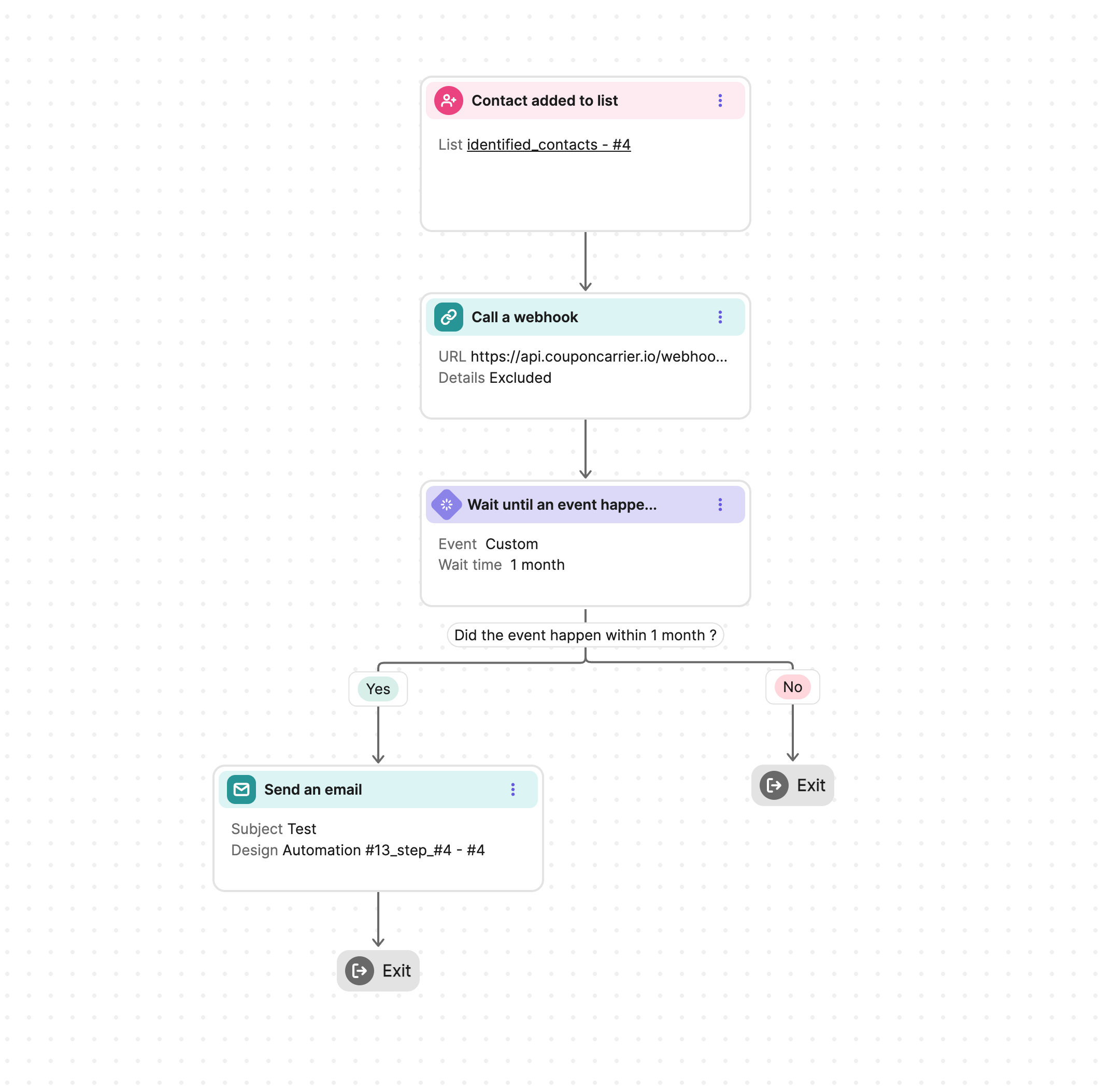
The integration uses Brevo's "Call a Webhook" action to request a code from Coupon Carrier. You keep full control over your email design and sending in Brevo.
- 1. Call a webhook.
- In your Brevo Automation, add the "Call a Webhook" action. This notifies Coupon Carrier over a secure connection.
- 2. Generate a unique code.
- Coupon Carrier receives the notification and instantly assigns a unique code to the contact.
- 3. Wait until event occurs.
- Your Brevo Automation pauses until Coupon Carrier confirms the code is ready by sending a "couponcarrier" track event.
- 4. Send your Brevo email.
- The automation resumes and sends your email, including the unique code using the `{{ params.code }}` personalization tag.
Frequently asked questions
- Why use a webhook instead of a direct action?
The webhook notifies Coupon Carrier as soon as the automation reaches that step, so the code is assigned in real time. Coupon Carrier then sends a track event back, and your automation waits for it before sending the email.
- What can trigger a code to be sent in Brevo?
Any trigger that can start a Brevo Automation can be used to deliver a code. The most common triggers are when a contact is added to a list or when an e-commerce event (like a purchase) occurs.
- Where do the codes come from?
There are three options. Coupon Carrier can create random codes for you with its built-in code generator. You can import your own list of codes you already have (like codes from your POS system, or a list made with our free code generator). Or you can connect an Autogenerated List from Shopify, WooCommerce, or Stripe to create unique, time-sensitive discount codes on demand.
- How do I make sure the email doesn't send before the code is ready?
In your Brevo Automation, add a "Wait until" step right after the "Call a Webhook" action. Set it to wait for the `couponcarrier` track event, which we send as soon as the code has been added to the contact. That way your emails never go out with a blank code.
Ready to automate your Brevo coupons?
Join thousands of businesses that have used Coupon Carrier in their marketing automations. Tens of millions of codes delivered.